
Every sellable unit that uses Amazon barcodes needs one FNSKU label on product packaging: 1 x 2 to 2 x 3 inches (25 x 51 to 51 x 76 mm), flat over any other barcodes. Since January 1, 2026, Amazon no longer offers item labeling as a service in the US.
Below, you’ll see a detailed breakdown of FNSKU label on product requirements by size, packaging type, printing, and factory instructions.
What Is an FNSKU Label and When Do You Need One?
An FNSKU label is the Amazon barcode that ties a unit in a fulfillment center to your seller account, not just to the product. FNSKU stands for Fulfillment Network Stock Keeping Unit, and every FNSKU on an Amazon barcode starts with X00.
Only Brand Representatives in Amazon Brand Registry can skip FNSKU labels without risking commingling, and only on new items with one scannable UPC, EAN, or ISBN matching one ASIN. Everyone else needs them: all resellers, including authorized ones, since March 31, 2026; brand owners outside Brand Registry; and used items, GTIN-exempt items, or items without a manufacturer barcode.
Amazon FNSKU Label Size and Print Requirements
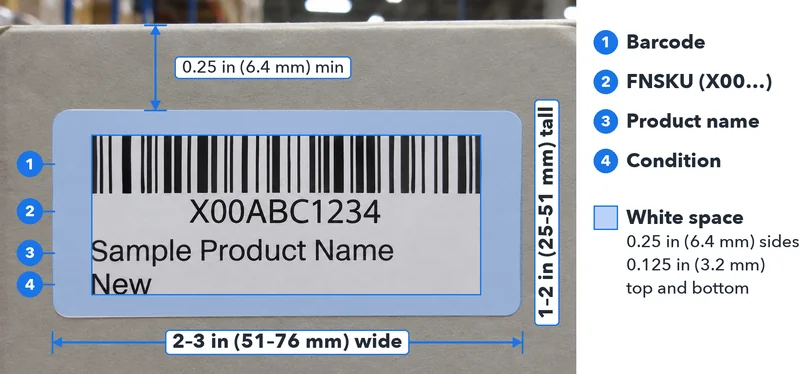
Amazon FNSKU label size runs from a 1 x 2 inch minimum to 2 x 3 inches, printed black on matte white with a 300+ DPI thermal or laser printer, never inkjet. A 2 x 1 inch thermal roll (width first) is the minimum. Keep 0.25 inch of white space at the sides, 0.125 inch top and bottom.
The diagram below shows label size and white space in inches and mm.
| Requirement | Spec |
|---|---|
| Allowed size | 1 x 2 to 2 x 3 in (25 x 51 to 51 x 76 mm); 1 x 3 and 2 x 2 in also fit |
| White space (quiet zone) | 0.25 in (6.4 mm) on the sides and 0.125 in (3.2 mm) top and bottom, both around the barcode and text and from the content to the label edge |
| Gap to package edge | 0.25 in (6.4 mm) minimum |
| Printed content | Barcode, FNSKU, product name, and condition |
| Label paper and printer | Black on white, non-reflective, removable adhesive, scannable for 24 months; 300+ DPI thermal or laser, never inkjet |
Don’t trust a phone scan when you print FNSKU labels. Phones read barcodes the fulfillment center rejects, especially small labels from a thermal FNSKU label printer under 300 DPI, so check prints for white lines or fuzzy bars and clean print heads often.
Where to Put an FNSKU Label on Product Packaging (By Package Type)
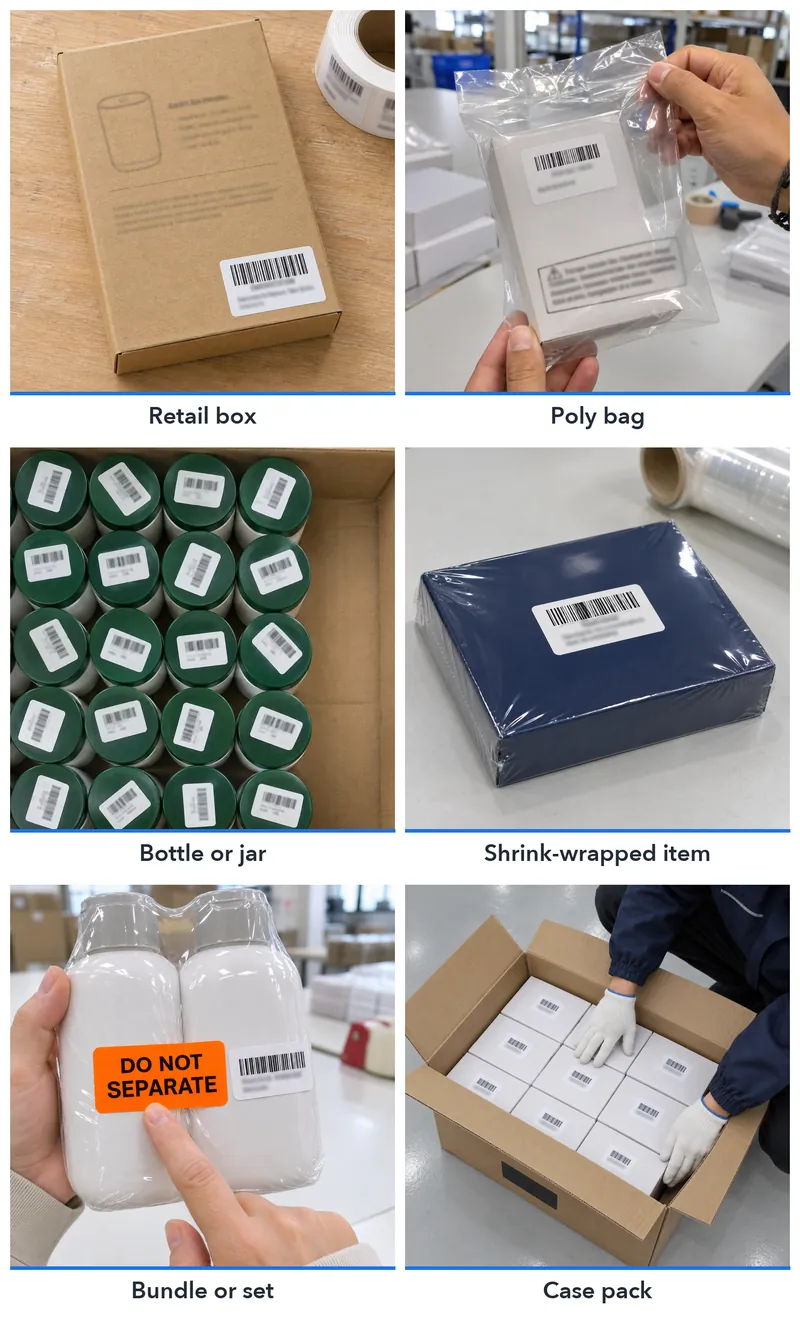
Put the FNSKU label on product packaging the customer receives: a flat outer face of the sellable unit, covering the UPC and every other visible barcode except serial numbers and Transparency codes, so only the FNSKU scans. Keep it 0.25 inch from edges, off curves, corners, and seams, and clear of warning or compliance labels.
The photos below show each setup.
| Packaging | Where the FNSKU goes | Mistake that gets units flagged |
|---|---|---|
| Retail box or book | Flat face, over the printed barcode | Adding a new UPC sticker while the printed barcode still shows |
| Poly bag | Cover the item’s UPC first, then label outside the sealed bag, or on the item if it scans through clear film | Several units in one bag |
| Too small to label | Bag the unit, label the bag | Folding the label around a corner |
| Bottle or jar | Vertical, bars parallel to the bottle, or on the flat lid | Wrapping it sideways around the curve |
| Shrink-wrapped item | Flat front, after shrinking | Over the heat seal or a wrinkle |
| Bundle, set, or multipack | Cover inner barcodes, seal units together, add one set FNSKU and a “Do not separate” sticker across the opening | One “Do not separate” sticker on the master carton |
| Case pack | An FNSKU on every unit; the case barcode peeled off, covered with opaque tape, or blacked out | Labeling only the carton |
Outer cartons get FBA box labels and shipping marks, never an FNSKU. A case pack must be factory-sealed with one SKU, one condition, and the same count in every case, up to 150 units. Master cartons holding inner cases don’t qualify, so ship each inner case separately.
Printing the FNSKU on Packaging, Plus “Made in China” and Bag Warnings
You can print the FNSKU straight onto boxes alongside “Made in China,” while poly bags take a paper FNSKU label plus a suffocation warning once the opening reaches 5 inches. Settle all three before printing.
Can You Print the FNSKU Barcode Directly on Your Packaging?
Yes, if the printed FNSKU barcode meets the sticker rules: FNSKU, product name, condition, and full white space. Print it black on a white matte patch, even on kraft or colored boxes, with no gloss varnish, and scan a printed proof first.
- Selling in stores too? Leave the barcode off and label by channel, or print the retail UPC on a flat spot a 2 x 3 inch FNSKU label can cover.
- Brand Representative in Brand Registry? Print your own GS1 UPC and ship new units without FNSKU labels.
How to Add “Made in China” and Suffocation Warnings Next to Your FNSKU
Put “Made in China” on the packaging or on a separate small label, never inside the FNSKU label: printed FNSKU labels must match the Seller Central layout exactly. Keep the origin mark clear of the FNSKU and its white space.
Every poly bag must be clear, at least 1.5 mil thick, and sealed. A bag with a flat opening of 5 inches (127 mm) or more also needs a visible suffocation warning, printed or stickered clear of the FNSKU. Near 5 inches? Add the warning anyway. Unmarked bags get rebagged for prep fees, or refused and disposed of at your expense.
How to Send FNSKU Labels to Your Factory in China Without Mix-Ups
Your supplier in China can put FNSKU labels on your products, and for repeat orders it’s the fastest route. Mix-ups come from three gaps: the wrong file, instructions the factory can misread, and nobody checking labels during packing.
Download the Right X00 PDF From Seller Central
Your factory can’t access Seller Central, so send the PDF: use Print item labels in Manage Inventory or Print SKU labels in Send to Amazon. Sheet templates are fixed: 30 per US Letter page, or 21, 24, 27, 40, or 44 per A4 page. Download the format the factory prints on: thermal rolls or one of those sheets. Then check:
- It shows this SKU’s exact FNSKU. Amazon barcode FNSKUs start with X00; a B0 number is an ASIN.
- It’s this shipment’s active SKU, not an older SKU on the same ASIN, and matches the FBA carton labels.
- It’s the PDF. Screenshots print as blurry barcodes.
- Each color and size has its own clearly named file (e.g., SKU-Blue-M.pdf), since each has its own FNSKU. Skip Print all SKU labels.
Copy-Paste FNSKU Labeling Instructions for Your Supplier
Paste this into your purchase order, fill in the brackets, and attach a placement photo or mockup.
FNSKU labeling requirements for PO [number]
1. Label size: [same as the PDF, e.g., 51 mm wide x 25 mm tall]. Print from a PDF reader at 100%.
2. One label per sellable unit, never on master cartons. Each label must match its SKU file: [SKU-Blue-M.pdf = X00XXXXXXX, New]. Delete old label files.
3. Cover the printed UPC or EAN barcode, but not warnings or origin marks. No extra UPC sticker. Keep labels 6.4 mm from edges and off corners, curves, and seams.
4. White matte labels, removable adhesive; 300+ DPI thermal or laser printer. No inkjet, no clear tape over labels.
5. One label file per SKU (color and size). Pack each SKU in separate cartons; mark the SKU, color, and size on each carton.
6. Sets: cover inner barcodes first, then bag or shrink-wrap the units together, add one set label, and put a “This is a set. Do not separate.” sticker across the opening.
7. Send close-up photos of the first labeled units for approval before mass labeling.
Check Labels During Packing, Before Cartons Leave China
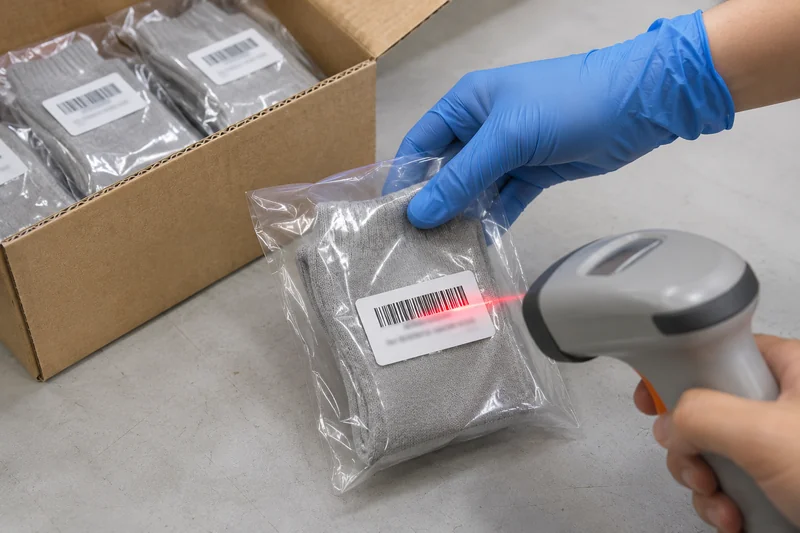
Labeling is usually the last packing step, after the factory’s own checks, so book the pre-shipment inspection for packing, not just production. As the photo below shows, scan units from every carton with a handheld scanner and confirm each matches the carton’s SKU.
Pull one labeled unit from each carton and photograph it beside the carton label, with the X00 number readable, so you can dispute defects. Wrong label caught in transit? Have the carrier intercept it before check-in.
Who Should Apply FNSKU Labels: You, Your Factory, or a Prep Partner?
FNSKU labeling by the factory works best with one familiar supplier and repeat orders. For a factory new to FBA, many colors, or several suppliers, have a China sourcing agent or warehouse inspect and label before shipping.
| Option | Best for | Main risk |
|---|---|---|
| You | Small test orders | Extra shipping leg, your time |
| Your factory | One supplier, repeat orders | Wrong file or misread brief, found late |
| China sourcing agent or warehouse | New suppliers, many colors, several factories | Depends on the agent’s checks |
| US prep center | US resellers, or stock already in the US | Mistakes already shipped overseas |
HiSourcing, a China sourcing agent, handles FBA prep and labeling in China before goods ship to Amazon. Goods sourced through HiSourcing carry no service fee, since the margin is in the unit price, and FNSKU labeling costs nothing extra by default.
For goods from your own suppliers, labeling is $0.05 per unit plus a 5% service fee on goods value under a purchase contract, covering receiving, outbound handling, 30 days of storage, and pre-shipment inspection with data, photos, and video.
Final Thoughts
Getting every FNSKU label on product packaging right comes down to three checks before goods leave the factory:
- Size: 1 x 2 to 2 x 3 inches, matte white, thermal or laser printed.
- Placement: the layer the customer receives, covering other barcodes except serial and Transparency codes.
- Factory control: this SKU’s exact X00 PDF before printing, and one photo per carton at packing.
An FNSKU label is only the last step before Amazon’s dock. If you’d rather hand off the whole chain, HiSourcing can find and vet suppliers, source the products, bundles, gift sets you want, inspect production, label and prep every unit, and ship straight to Amazon FBA. Contact Us for a free quote.
You might like to read:
- Amazon FBA Warehouse Locations: US Codes, Addresses, and Seller Shipping Rules
- How to Import from China to USA: Steps, Costs & Customs
- How Long Does Shipping from China Take?
FAQ
Are FNSKU, ASIN, and SKU the same thing?
No. Your SKU is your internal inventory code, a UPC is the manufacturer’s retail barcode, an ASIN (usually B0…) is Amazon’s shared product page ID, and an FNSKU (X00…) marks each unit as yours.
How much does Amazon charge to put FNSKU labels on?
Amazon no longer offers this in the US: it ended FBA prep and item labeling on January 1, 2026. Units must now arrive labeled by you, your supplier, or a prep partner.
Can you print the ASIN on the label instead of the FNSKU?
No. A SKU that uses Amazon barcodes needs its X00 FNSKU, and a B0 ASIN barcode doesn’t tie units to your account. If Seller Central gives you a B0 label, create a new SKU set to Amazon barcodes.
How do I download FNSKU labels without the edges getting cut off?
Download FNSKU labels from Manage Inventory (Print item labels) or Send to Amazon (Print SKU labels) in the template matching your label stock, then print from a PDF reader at None or 100% scaling. Browser printing, scaling, and mismatched templates cut off edges.
What happens if FNSKU labels arrive missing, unscannable, or on the wrong SKU?
Amazon still stickers a unit missing a required FNSKU, but logs an Inbound Performance Dashboard defect. Unscannable labels cause delays and unplanned prep fees, and wrong-SKU units often need removal and relabeling. Mislabeled units get no loss, damage, or discrepancy reimbursement, and noncompliant inventory can be refused, disposed of at your expense, or blocked from future shipments.


